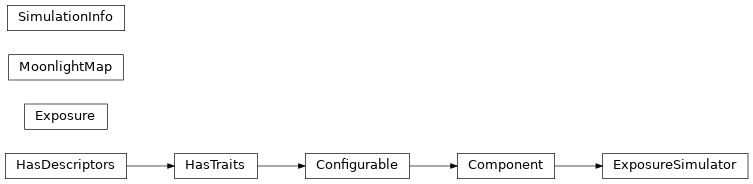
Exposure handling (ctapointing.exposure)
The Exposure class within the ctapointing.exposure module is the core class to store information about a camera exposure, including the image itself, methods to read/write an image for FITS format, and methods to perform coordinate transformations in/from the plane of the camera chip.
The class ctapointing.ExposureSimulator provides functionality to simulate pointing images of the sky, including proper field rotation, moon light simulation and the possibility to simulate science camera LEDs and star light reflected by the closed lid of the science camera (e.g. for simulating pointing observations).
API
ctapointing.exposure Package
- class ctapointing.exposure.Exposure(is_simulated=False)
Class holding a PointingCamera image, including meta information such as telescope pointing and image meta data.
While a new
Exposureobject can be directly instantiated by calling the constructor, the more frequent use cases areconstruction by reading an image from database and file, using the
Exposure.from_name()methodconstruction by simulation, using the
ctapointing.exposure.ExposureSimulator.
See tutorials to learn about frequent use cases.
Exposuresupports low-level image reading from and writing to FITS files through the methodsExposure.read_from_fits()andExposure.write_to_fits().- __init__(is_simulated=False)
- property altazframe
Return AltAz coordinate frame, using currently available meta information.
- camera_gain
camera gain (float)
- property camera_pointing
Calculate sky coordinates of the camera centre, using actual telescope pointing and SkyCameraFrame parameters.
Caution
Coincides with the telescope pointing position only if the camera is not tilted against the optical axis of the telescope
- Returns:
camera_centre – camera centre in the ICRS frame
- Return type:
SkyCoord
- create_empty_image()
Create an empty image.
- classmethod from_container(container)
Construct Exposure object from an ExposureContainer
- Parameters:
Container (ctapointing.exposure.ExposureContainer) – instance of ExposureContainer from which exposure is filled
- Returns:
exposure – exposure object
- Return type:
Exposure object
- classmethod from_name(name, **kwargs)
Construct an instance by reading the image information from the database or directly from the FITS file.
- Parameters:
name (str) – image filename in case of reading image directly from file, UUID in case of reading from container/database
**kwargs – see below
- Keyword Arguments:
load_image (bool) – load image pixel data (defaults to True)
load_camera (bool) – load camera data from database (defaults to True)
read_meta_from_fits – read meta-data (exposure time, location etc) directly from image FITS header (defaults to False)
swap_y – swap y coordinate of pixel data (defaults to False)
- Returns:
exposure – instance of Exposure object
- Return type:
Exposure object
- get_array_indexes(coords: ndarray)
Return internal numpy array indexes that represent given pixel coordinates
- Parameters:
coords (numpy.ndarray) – 2D array of pixel coordinates
- Returns:
(pixel_coords, mask) – internal pixel coordinates and mask indicating valid (on-chip) pixel coordinates
- Return type:
tuple of numpy.ndarray
- get_intensity(coords: ndarray)
Return the intensity value stored in the image at the particular coordinates
- Parameters:
coords (numpy.ndarray) – 2D array of pixel coordinates
- Returns:
intensity – pixel intensities at given coordinates
- Return type:
numpy.ndarray
- property mean_exposure_time
Return time of mean exposure of image.
- property moon_phase
Return Moon’s phase at mean exposure time
- Return type:
Moon phase (float)
- property moon_position
Return Moon’s AltAz position at mean exposure time
- Return type:
Moon’s position in AltAz frame (SkyCoord)
- read_from_fits(name=None, **kwargs)
Read image data from FITS file. The image can be flipped on the vertical axis, since this is standard for the real images.
Recursive search is possible, e.g. to search subdirectories of image_path.
- set_intensity(coords: ndarray, intensities: ndarray)
Set image intensity at coordinates coords to values intensity
- Parameters:
coords (numpy.ndarray) – 2D array of pixel coordinates
intensities (numpy.ndarray or list, float, int) – 1D array of intensities or single intensity value
- property skycameraframe
Return a SkyCameraFrame object, initialised from current exposure (observation time, location, telescope pointing) and camera (focal length, rotations, tilts etc.) properties.
Can be used to transform from/to SkyCameraFrame using up-to-date transformation parameters.
- property sun_position
Return Sun’s AltAz position at mean exposure time
- property telescope_pointing_altaz
Return AltAz telescope pointing, i.e. the telescope orientation at the time of mean exposure.
- to_container(prefix=None)
Write exposure image information to a ctapipe.core.Container for file or database storage.
- Parameters:
prefix (str or None (default to None)) – prefix passed to ctapipe.core.Container
- Returns:
exposure_container – instance of exposure container
- Return type:
ctapipe.core.Container
- transform_to_camera(coords, to_pixels=False)
Project a given sky coordinate into the CCD chip. Takes current camera orientation, camera intrinsic parameters and distortions into account.
- Parameters:
coords (SkyCoord) – sky coordinate (ICRS or AltAz)
to_pixels (bool) – True: convert to camera pixels False: convert to SkyCamera coordinates
- Returns:
coords
- Return type:
SkyCoord in SkyCameraFrame or array of pixel coordinates
- transform_to_sky(coords, update_skyframe=True)
Project a given array of SkyCameraFrame coordinates to ICRS. Takes current camera orientation, camera intrinsic parameters and distortions into account.
If update_skyframe is True, all SkyCameraFrame parameters that are internally stored in coords will be updated by the ones stored in this exposure object (only modifying the coordinate frame’s meta information, not the coordinate values themselves).
- Parameters:
coords (SkyCoord) – coordinates in SkyCameraFrame system
update_skyframe (bool) – update coordinates with current SkyCameraFrame parameters
- Return type:
SkyCoord in ICRS system
- property uuid
Return UUID of the exposure.
- write_to_fits(filename, **kwargs)
Write the image data to FITS file, with appropriate meta information. The image can be flipped on the vertical axis, since this is standard for the real images.
- Parameters:
filename (str) – image file name (including full path)
- class ctapointing.exposure.ExposureSimulator(**kwargs: Any)
Class that simulates images of the sky.
- __init__(config=None, parent=None, **kwargs)
- Parameters:
config (traitlets.loader.Config) – Configuration specified by config file or cmdline arguments. Used to set traitlet values.
parent (Tool or Component) – If a Component is created by another Component or Tool, you need to pass the creating Component as parent, e.g. parent=self. This makes sure the config is correctly handed down to the child components. Do not pass config in this case.
kwargs – Traitlets to be overridden. TraitError is raised if kwargs contains a key that does not correspond to a traitlet.
- ambient_pressure
ambient pressure
- ambient_temperature
ambient temperature
- apply_moonlight
apply moonlight simulation
- apply_noise
apply noise in simulation
- classmethod from_config(**kwargs)
Read an ExposureSimulator configuration from either configuration file or database. Either the path of a configuration file (‘input_url’) or a database collection (‘collection’) must be provided.
- Parameters:
input_url (str or Path) – path of the configuration file.
name (str) – name of the ExposureSimulator (as in ExposureSimulator.name). When loading the configuration from file, can be set to check that the configuration with the correct name is loaded. When loading from database, is used to identify the correct database record.
uuid (str) – UUID of the camera (as in ExposureSimulator.uuid). When loading the configuration from file, can be set to check that the configuration with the correct UUID is loaded. When loading from database, is used to identify the correct database record.
collection (str) – name of the database collection from which configuration is read
database (str) – name of the database in which the collection is stored
- Returns:
extractor
- Return type:
SpotExtractor object
- max_magnitude
maximum magnitude of stars that are simulated
- min_magnitude
minimum magnitude of stars that are simulated
- name
name of ExposureSimulator
- num_time_steps
number of time steps used in simulation
- num_unsharp_rays_leds
number of light rays simulated per LED
- num_unsharp_rays_stars
number of light rays simulated per star
- process(camera, telescope_pointing, start_time, duration, science_camera=None)
Perform the sky simulation.
- Parameters:
camera (ctapointing.camera.PointingCamera) – pointing camera object
telescope_pointing (astropy.SkyCoord) – pointing position of the image
start_time (astropy.Time) – start time of the simulated observation
duration (astropy.Quantity) – duration of the exposure
science_camera (ctapointing.camera.ScienceCamera) – science camera (for body and LED simulations, stars on lid)
- Returns:
exposure – exposure object including simulated image
- Return type:
- unsharp_radius
radius defining un-sharpness of stars
- unsharp_radius_lid
radius defining the un-sharpness of reflected stars on lid
- uuid
UUID of ExposureSimulator
- class ctapointing.exposure.MoonlightMap
Implements the calculation of a moonlight brightness map, following equation (15) of the paper by Krisciunas et al. (doi:10.1086/132921)
The brightness is calculated for a given array of altaz coordinates. Time of observation and observer’s location are extracted from these coordinates.
Brightness is in units photon flux per steradian.
- B(coords_altaz, moon_altaz, alpha, k=0.172)
Equation (15) of Krisciunas et al. Only valid for moon above the horizon. If moon is below horizon, brightness 0 is returned.
- Parameters:
coords_altaz (SkyCoord) – altaz coordinates for which to calculate brightness
moon_altaz (SkyCoord) – altaz coordinates of the moon
alpha (Angle) – phase angle of the moon
k (float) – V-band extinction in units of mag/air mass
:returns photon flux map :rtype array of astropy.Quantity
- I(alpha)
Illuminance of the moon as function of moon phase angle. :param Angle alpha: phase angle of the moon :returns moon illuminance :rtype: float
- X(zenith)
Atmospheric absorption as function of zenith angle
- __init__()
- f(rho)
Atmospheric scattering function as function of the distance between moon and observation. :param Angle rho: (array of) separations to the moon :returns amount of scattered light :rtpye (array of) float
- process(coords)
Calculate moon brightness map.
- Returns:
brightness list, sun/moon coordinates, moon phase
- Return type:
array of astropy.Quantity, two astropy.SkyCoords, astropy.Angle
- class ctapointing.exposure.SimulationInfo
Meta data class for simulated images.
Stores simulation information about the simulated image, such as true RADec position of the centre of the simulated exposure, minimum and maximum magnitude of stars simulated, whether or not noise/moonlight have been simulated.
- __init__()
Classes
|
Class holding a PointingCamera image, including meta information such as telescope pointing and image meta data. |
|
Class that simulates images of the sky. |
Implements the calculation of a moonlight brightness map, following equation (15) of the paper by Krisciunas et al. (doi:10.1086/132921). |
|
Meta data class for simulated images. |
Class Inheritance Diagram